> ## Documentation Index
> Fetch the complete documentation index at: https://fillout-005a867b-dependabot-npm-and-yarn-form-data-4-0-6.mintlify.site/llms.txt
> Use this file to discover all available pages before exploring further.
# Manage and limit form access
> Disable acceptance of new responses immediately, upon a particular expiration date, or when it reaches a certain number of submissions. Optionally set a form open date.
## Edit form access
Click in the top right to open form settings. Navigate to `Access`. Toggle the features below as you see fit.
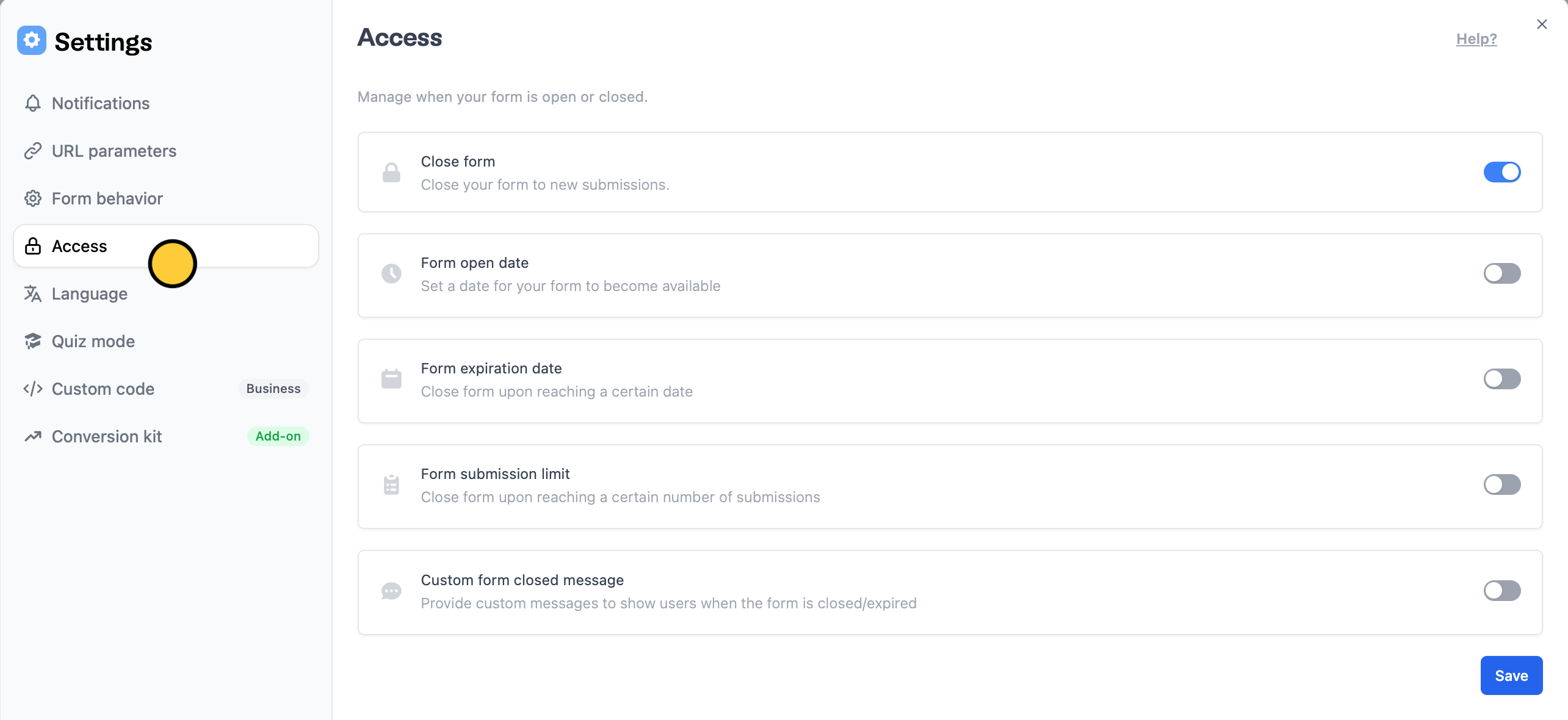 You can change form access by enabling:
* **Close form** - immediately disables your form and prevents new submissions
* **Form open date** - choose when you want to start accepting responses
* **Form expiration date** - choose when you want to stop accepting responses
* **Form submission limit** - disable access upon receiving a certain number of responses
* **Custom form closed message** - edit default message shown when the form is closed
## Limit to one response
To limit each respondent to one response, add a login page and [enable this setting](https://www.fillout.com/help/login-page#email-login).
You can change form access by enabling:
* **Close form** - immediately disables your form and prevents new submissions
* **Form open date** - choose when you want to start accepting responses
* **Form expiration date** - choose when you want to stop accepting responses
* **Form submission limit** - disable access upon receiving a certain number of responses
* **Custom form closed message** - edit default message shown when the form is closed
## Limit to one response
To limit each respondent to one response, add a login page and [enable this setting](https://www.fillout.com/help/login-page#email-login).